Today I finished another program of mine, this time one very closely tied to and working together with my hosting www.sunamo.net , as the name surely suggests. The program looks something like this:

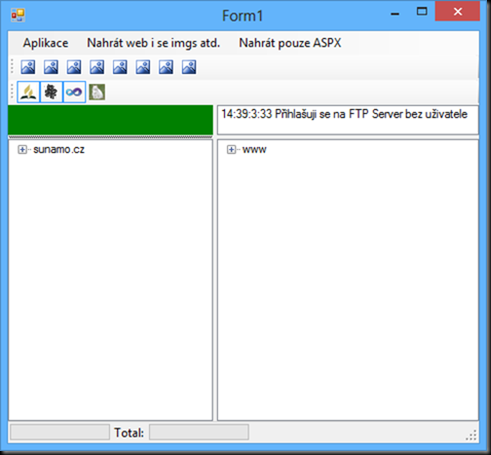
The ToolStripMenuItems at the top don’t do anything yet, except for Application, which shows the Log form. The program isn’t multithreaded yet, so when the application is running some operation or gets stuck in some method, the program freezes and all you can do is close it. Likewise, in the bottom bar, where you can see the 2 progress bars and the “Total: ” label, nothing happens yet. That’s because the program doesn’t first figure out everything that has changed and only then upload or delete from the hosting; it does it as it goes. An idea for improvement!
Everything else you see, though, is fully functional. The small log area with a single message is so sparse because I just launched the program, and besides, I’m writing this in the car, where there is no internet connection, so the program first tries to connect to the FTP server, and when that fails, it skips the other methods (login and password, changing to a directory, etc.).
As I wrote in my previous blog post The server has been sent to a retirement home for domains., every website now has its own folder, which is “isolated” from the folders of the other websites. Isolated in the sense that if this folder contains some code that another website also uses, I move that code into the Shared folder.
This guarantees that whenever I want to “shut down” any website, I only need to delete a single folder. Of course, the DB entries, CSS styles and images that live in other folders will remain, but if I only want to block access to a website, I can quickly delete or rename a single folder. That’s just a bonus, though; the real advantage is that I don’t have all the aspx files in one folder, and several websites can have a page with the same name.
I’ve described this in such detail because it’s important for you to know what the individual buttons will do, each of the 8. Most of them, just like the 1st one, split the folders and subfolders according to what needs to be done with them and then do it with each of these folders. There is also a “do nothing with the folder” action, both recursive and just “local“. If such an action is set, nothing can override it.
The first button uploads all websites selected in that list with the 4 icons. The 2nd button also uploads the unselected websites. The third button refreshes the file list in the TreeView (tree) on the left. It always refreshes automatically anyway when I want to synchronize changes, but if I want to refresh it manually, I can do that too. The 4th button is very important when I have uploaded something to the hosting using another FTP client and therefore have outdated data in the DB about the files on the hosting.
The 5th button removes unused files on the hosting that aren’t present locally, but leaves empty folders behind – or rather, it doesn’t check which folders have been left empty. The 6th button is similar, except that after removing all files from a given folder, it checks whether the folder is empty and if it is, it removes it.
The 7th button is similar to the 1st; it works on the same principle, but it doesn’t get the list of files on the hosting from the FTP server, but from the DB. That speeds up the whole process considerably. The 8th button is similar to the 2nd because it again uploads all websites, and it takes the information about what is on the hosting from the DB.
Developing this program took me about 3 days in total, which isn’t much, but there were long breaks when I did nothing in between, so in terms of calendar time I developed it over about 8 days. At the beginning there was a long break of several days, then in 1 day I practically finished the whole thing, but then I found out that uploading to the web didn’t work (the class I used sent low-level sockets directly and didn’t work with the FtpWebRequest class). So I replaced that upload method with one using FtpWebRequest.
That helped, but later I found out that the method sending the FTP LIST command (detailed directory listing) didn’t work. I struggled with it a bit, because it returned 226 Transfer Complete and yet still threw an error, but in the end I solved it by using the proven approach with FtpWebRequest.
After that things got going; the last thing I worked on was the database work, and of course debugging and testing. It is programmed very sloppily and chaotically, and lots of things could be moved into separate methods and reused more often instead of me writing them again every time. On the one hand, that would increase abstraction and code execution time; on the other hand, the program would be cleaner, clearer and more maintainable.
The amount of code would also decrease slightly.