I looked this up once before, but since I never ended up using it and didn’t really need it again, I forgot how it works and everything else about it. Today this picture, which I found on stackoverflow, helped me a lot to get the basic idea: 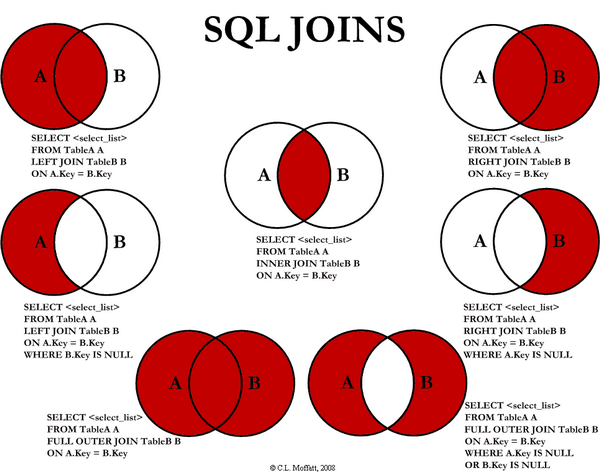 Then I created these 2 tables in SQL Server Management Studio: Albums table:
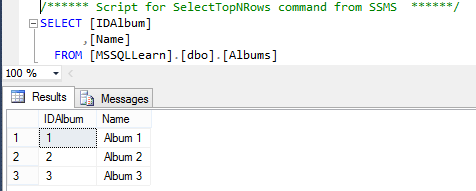
Photos table:
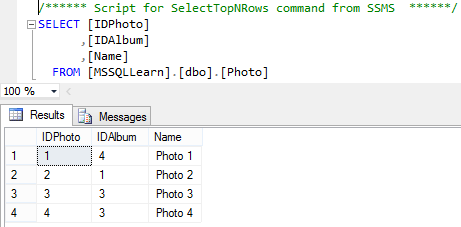
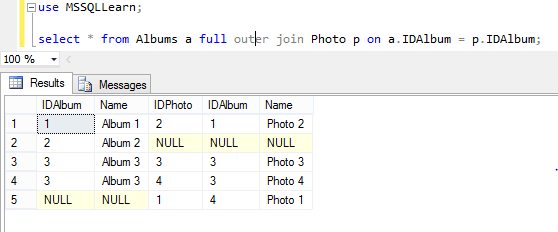
And now the results and descriptions of the individual sql join types: Full Outer Join: Full Outer Join is what you use when you want to get all the data from the tables grouped by their key, which is specified in the on clause at the end of the SQL query. So this statement:
use MSSQLLearn;
select * from Albums a full outer join Photo p on a.IDAlbum = p.IDAlbum;
You can see the result of this statement here:
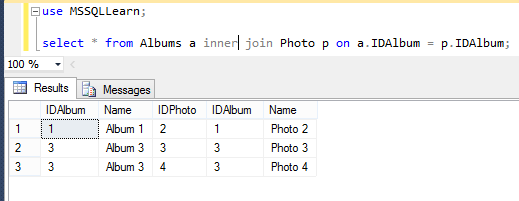
Later we will show how to get only specific columns. Inner Join: This is probably what you will need in most cases. Simply put, it returns only those rows from the tables that have the same key. I wrote this SQL statement:
use MSSQLLearn;
select * from Albums a inner join Photo p on a.IDAlbum = p.IDAlbum;
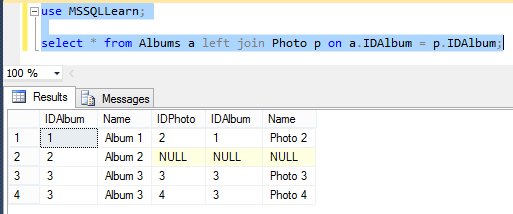
Left Join: The table I specify after left join does not have to contain the value used in the on clause. The values of such missing table columns are then replaced with NULL. So here is a simple rule of thumb for deciding when to use left and when right join: use left if you want all rows from the main table, i.e. the one you specify after the word from. Use Right if you want all rows from the table you specify after the join keyword:
use MSSQLLearn;
select * from Albums a left join Photo p on a.IDAlbum = p.IDAlbum;
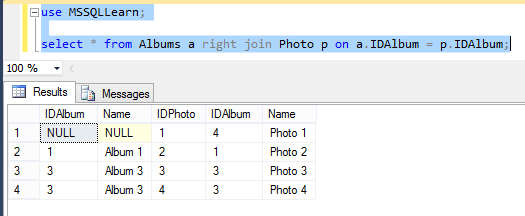
Right Join: This is analogous to left join, just the other way around. That means all rows from the table specified after join will be listed, and rows that have no matching key in the table after from will have null in the columns.
use MSSQLLearn;
select * from Albums a right join Photo p on a.IDAlbum = p.IDAlbum;
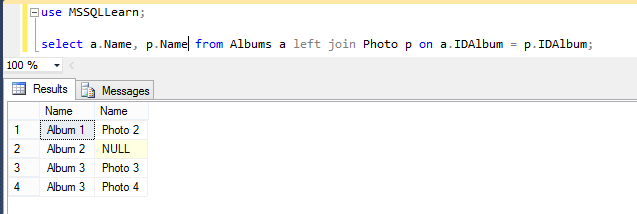
Any Join with selected columns from any table Finally, what I promised. It’s no rocket science and this is surely carrying coals to Newcastle, I just want to show that it really works:
use MSSQLLearn;
select a.Name, p.Name from Albums a left join Photo p on a.IDAlbum = p.IDAlbum;