Last night I wanted to compile the source code of MonoDevelop, or rather just its C# parser, but it didn’t work because some files were missing. In the end, judging by the contents of a file, I figured out that I was probably supposed to generate the Makefile or *.sh scripts myself. Both of those, however, are the domain of Linux, or rather Unix; Visual Studio can only run Makefile.win.
Now I’ll copy here some of what I wrote today on G+: — I was looking into whether there is some kind of Linux that runs from a flash drive. Apparently there are some, although the information about them was pretty poor. Nowhere could I find out whether it works like a normal system installed on a disk, or whether it is just like a Live DVD and nothing else can be written to the flash drive.
Probably the former, but as I said – I never found out. So I looked at Wubi. What put me off there was that although it creates a file on the disk instead of a partition, it still writes itself into the bootloader, so I would have to choose at startup which OS I want to boot into. But now it occurs to me that the bootloader was the one from Windows, and in Win you can set which OS to boot into without asking, or whether it should ask. With an SSD and a “very lightweight” Linux, I probably shouldn’t worry about it being slow.
But then there’s the problem that I don’t know how files work there. Ideally it would have direct access at least to the physical D: drive. Then, of course, there’s a virtual PC. But again – this area of Linux virtualization is ruled with an iron fist by Virtual PC built on Java, and I don’t want to wait forever for everything.
The second-to-last option is to simply put it in a dual boot. If I had an extra HDD, or better an SSD, then sure – it would be a pain to keep switching the cables of the HDD, but in terms of speed and not messing up my Windows, it’s the best option. (This is another thing HP screwed up: in their top line of desktops they put 3 (THREE) data ports on the motherboard.
One is taken by the DVD drive and the remaining 2 already have an SSD and an HDD.) Then I’d just have to pray that the famous Linux doesn’t “break” some file or the whole NTFS on D:. And the last option – download some applications that bring at least a “Linux Command Line Environment” to Windows. And here’s how that went:
MinGW – I download the installer, run it, it downloads 111 files out of 111, and in the Details I see 4 tiny archives with some Linux extension (something like .tar.gz).
The Continue button stays grayed out, Quit is enabled, and after about 15 minutes of waiting while the program does nothing and there is zero network traffic, I hit Quit.
CygWin – I selected all the packages from the devel category. Almost everything there was “make”, about 10 in total.
However, in 2 hours, on a connection running at 1500-2000 kB/s, it downloaded only 166 MB, which is 1% of what it was supposed to download. Not that the connection was that slow; the main problem was that the files were mostly around 50 kB, but an even bigger problem was that it would download those 50 kB and then wait a minute or two, with the PC completely idle. Then again, they have about 100 mirrors, I’ll give them that.
GnuWin32 – I download the installer, run it, hoping for my last iron in the fire. It downloads a few files into a folder it chose itself, namely D:\Downloads\GetGnuWin32 .
But make(.exe/.bat/.cmd) isn’t among them, and even the included install.bat doesn’t work. — I went to bed resigned to having only the SharpDevelop C# parser, or some simple one of my own, which would however take me ages to write.
In the morning, though, I woke up thinking that I could install that Linux after all. I just wrote about it on G+ and headed into town. I came back with a 250 GB SSD Samsung Evo 850, which I bought for a pretty good price (a post-Christmas sale). As soon as I got home, I swapped the old Kingston SSD for the new Samsung and installed a clean Windows 10 Pro Threshold 2.
The speed didn’t seem much higher than on the Kingston, but it was installed from a flash drive, and PC performance isn’t determined only by the HDD/SSD, but by all the components. I measured the performance of the Samsung SSD with a single test, which turned out like this:
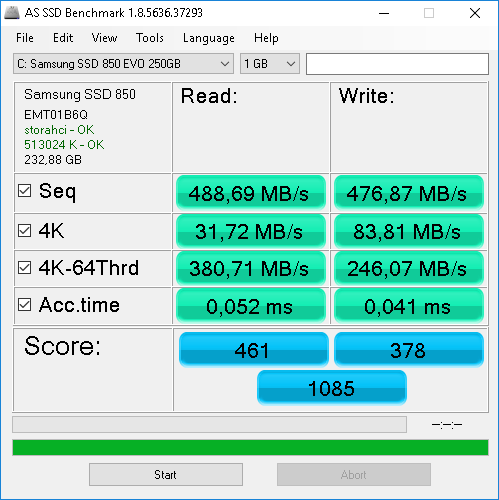
Then, as planned, I swapped the SSD again, moved files from the Kingston to the HDD, cleaned up temporary files and made a disk image in Acronis. Then I installed exactly the same Win and programs on this SSD as well. The result?
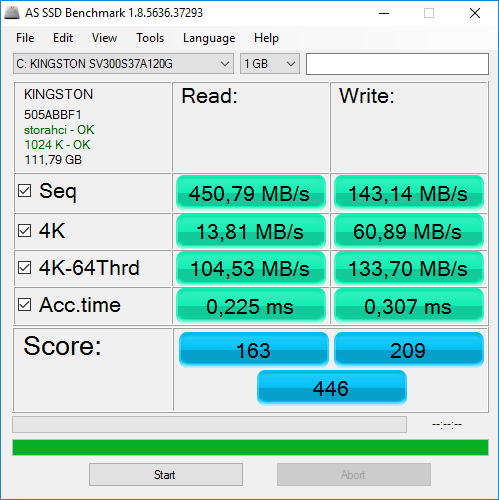
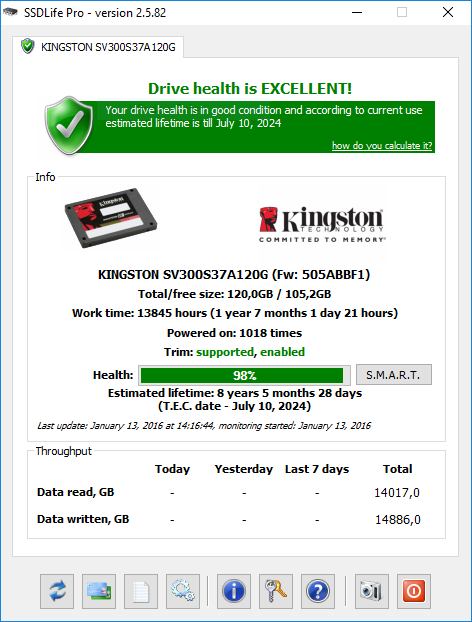
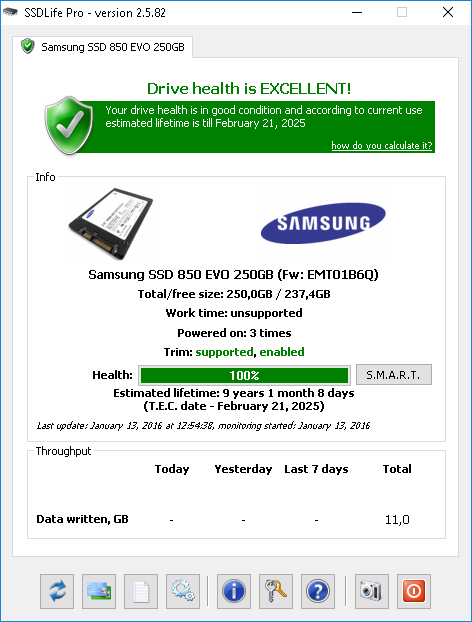
What surprises me is that the Kingston has noticeably faster writes. Also notice that the Kingston SSD has logged over 1 year and 7 months of pure operating time, during which it read over 14 TB and wrote almost 1 TB more than that. All that was left was to install Linux. From Elementary OS, I only had version 0.2 (Luna) as an ISO and on DVD; otherwise just a bunch of Ubuntu and one Mint 16 Petra. I had tried Mint and found it repulsive in appearance, and Ubuntu is even uglier than Windows 8. Not to mention their ergonomics and controls.. When it told me the PC wasn’t connected to the internet, I didn’t pay attention to it. I told myself I would push the drivers in there somehow, “no matter what”. I didn’t feel like downloading the new Elementary OS, which is 1.2 GB. The installation went smoothly; I put GRUB on the partition with Elementary, so that I didn’t mess up the bootloader, and when I turned the PC on after the installation, it of course booted into Windows 10 as expected. I installed EasyBCD and created a new boot entry – Elementary OS.
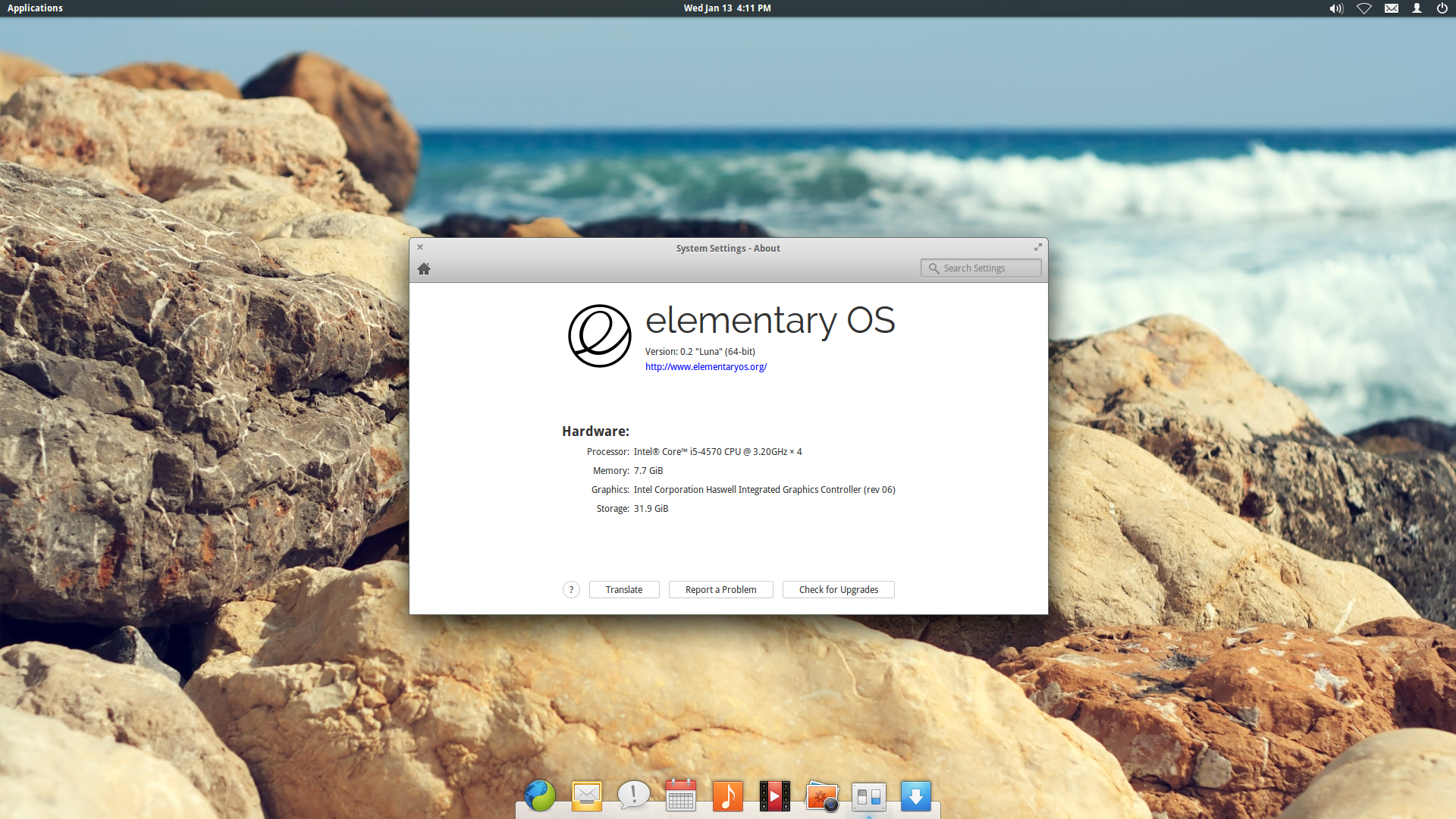
After booting, the mouse didn’t work. I tried plugging it into the front, but then the keyboard didn’t work. In the end I plugged both into the back and it worked somehow – provided I didn’t have my Xperia connected for internet sharing during boot; otherwise one of the peripherals showed no signs of life.
Then I dealt with the internet. Luna is an OS from August 2013, so it’s even older than the PC I have at home. Not to mention the WiFi dongle, which I’ve had for about 2 months. Via USB Tethering I downloaded about 350 MB of new packages and hoped that the drivers would get installed along with them. But no – both before and after, “Additional Drivers” reported that no proprietary drivers are available.
I installed what I could through the GUI; the HP website had no drivers for Linux, only for Windows 7-10. So, disappointed, I swapped the SSD drives again and downloaded the aforementioned Elementary OS of about 1.2 GB in 16 minutes. Then I put it on a flash drive and wanted to install it. Everything went like clockwork until it was time to install GRUB, which is traditionally the very last thing in the whole Linux installation.
It showed me an error without any description, just “fatal error, setup cannot continue”, and after clicking the only button, the installation started over. So I booted it again and tried installing GRUB to /dev/sda, which is where the Windows Bootloader is. But that didn’t work either. I don’t know exactly what UEFI is, but I couldn’t think of any other way to get around this, so I restarted the PC, pressed F9 and, instead of the DVD drive under UEFI, I chose Legacy Boot Sources. I just didn’t know whether to choose the first or the second Install Elementary OS.
I chose the first one, and only now did GRUB install correctly and the whole installation completed successfully. After rebooting, I set it to log in automatically and tried to edit /etc/default/grub following a guide on the internet so that it would boot straight into the first entry without waiting for anything. But no matter what I set, the result was nothing, so I downloaded grub-configurator, which has a GUI, and with it I set it up in 3 clicks and it worked right away. As for Elementary OS 0.3.2 Freya, which is what I have, it recognized both the Ethernet network card and even the aforementioned tp-link Wi-Fi dongle.
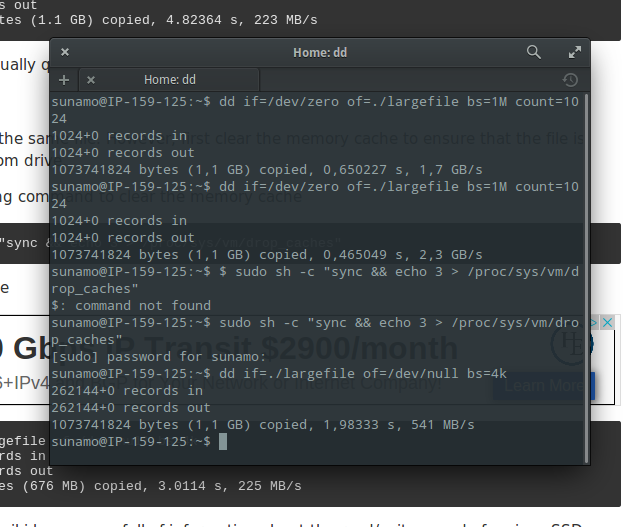
I also wanted to measure the speed of the SSD, but either it didn’t work or it produced nonsensical values – see, for example, the dd command here (the first is the read speed, even 2x, I couldn’t believe it):