I no longer remember exactly why, but back then I tried both shared projects and shared assemblies (.dll). It didn’t work, so I ended up with many classes all over my projects that also existed elsewhere. I still struggle with it to this day – with those projects. So until now I have effectively had 3 shared solutions/projects:
- sunamo.cz – my website; my other websites (such as webelieve.cz) had linked references to sunamo.cz files and everything worked
- swf – “Sunamo WIndows Foundation” – for desktop applications, dating back to the days of Windows Forms, and it was the most bloated
- wsf – “Windows Sunamo Foundation” – at the start I copied files over from swf, had to modify some of them due to interface changes, and from then on the project lived a life of its own
Now, at the end of 2015, I would like to start focusing more on Windows Store Apps. I had several paths in front of me for how to develop these apps:
- Everything as before
- Shared source code – hard to manage, because some method might be missing somewhere and I would immediately need multiple source files. But setting that aside, it would be the best solution, and I now somewhat regret that I didn’t go down this path
- Shared projects – what I have now.
This brings the following joys:
- Almost no duplicated source code anymore. Most of it is in the drawing-related classes (which are missing in Store Apps – there everything is handled purely through styling) and then, of course, in Controls, because web, desktop and Windows Store Apps differ not only in appearance but also in behavior.
- I can maintain the best of everything in one place.
- Anything I add to one project I can use everywhere immediately.
And these worries:
- Longer opening times, and an unbearably long compilation time. Especially for sunamo.cz. I have already requested that the sunamo.cz domain be pointed to my VPS, where I will start building my new website, made in .NET Core and written in Visual Studio Code using the MVC coding style.
- For some reason, sunamo.cz, which is connected to the shared projects, doesn’t remember its settings.
- The need to add more (at least
2) projects to the solution. But that is the least of it. The previous 2 problems bother me more.
And which new assemblies do I have?
- sunamo – the base library for all of them, inherits from nothing
- apps – for Windows Store Apps, inherits from sunamo
- shared – for web + desktop programs, inherits from sunamo
- forms – for Windows Forms desktop programs, inherits from sunamo, shared
- desktop – for Windows Presentation Foundation desktop programs, inherits from sunamo, shared, forms
- web – for web applications, inherits from sunamo, shared
And finally, here is how all projects must be configured with regard to the processor platform target:
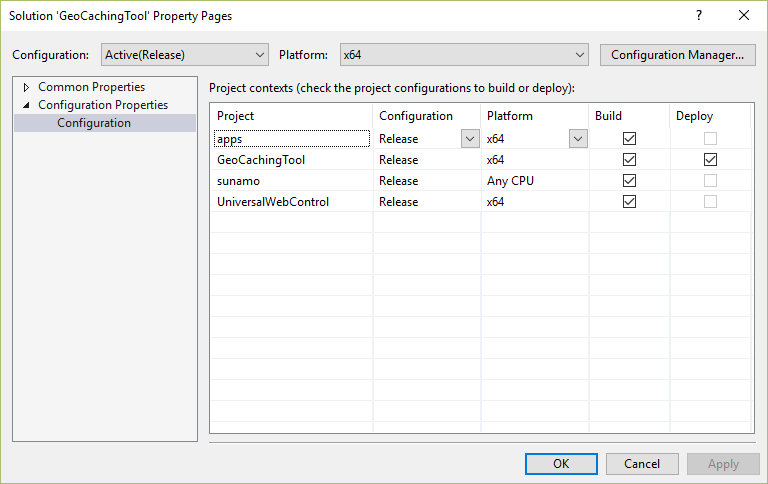
This is shown for x64 and Release. For x86 and ARM it is completely analogous, and of course for Debug as well.