To be honest, I’m not even sure I want people uploading piles of images there, because I only have 5 GB of space in total ( http://www.aspone.cz/cz/Webhosting/Developer/) and right now 1202 MB of it is taken:
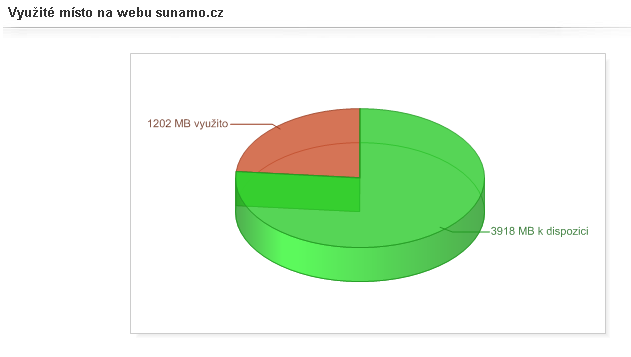
That covers the website files, my 7,700 images in the photo gallery, other images elsewhere (mostly on the CasdMladez website) and possibly some temp files, which I try to delete every night with a script. So now let me describe what the photo gallery can do. On the home page photos.sunamo.cz you will find lists of the most popular images, albums and galleries, at most 10 of each. Of course, items with 0 views are not shown just to fill up the list. Only public photos, albums and galleries are displayed, but otherwise it is simply the most popular of everything.
And in case it isn’t clear what exactly these 3 terms mean in my photo gallery, let me explain. A gallery is the name for all albums and photos of one user. A gallery can be entirely public or hidden. Having a hidden gallery doesn’t mean you can’t make any of its sub-albums public, but they can probably only be reached through a search engine (e.g. Google) or my internal full-text search, which can search either across all users or within the currently displayed gallery.
Of course, private albums or photos will never be shown. You can search album names, album descriptions, photo names or photo captions, but only one field at a time (for example, only album names, not several fields at once).
I don’t know for sure yet what it is, but if you open my gallery, for example https://photos.sunamo.cz/en//en/gallery/1, and search for anything, it takes a moment while it sends data that it shouldn’t be sending at all (my guess is that I simply forgot to use enableviewstate="false" on everything where I don’t need VS, so I’ll try to fix that soon too). Basically, some data from the objects on the page, meaning albums and images, gets sent. An album is a folder for images.
Albums can be nested as deeply as you like (the only limit is the path length, which in NTFS is 255 characters excluding the file name; since my hosting runs on Windows Server, the same rules apply as on Windows), and there can be up to 10,000 of them, if you put 1 photo in each album. Albums that are left with no photos after the last one is deleted are deleted completely as well. Likewise, albums that don’t contain a single image in a supported format will not be uploaded.
Albums have names taken from the upload, which cannot be changed, and descriptions that each user can change as they please. The only thing that bothers me a bit is that a 4:3 image at 5 Mpx, which gets scaled down along both 2 axes to 1024×768 px, fits exactly on my monitor with a resolution of 1600×900, but then you can no longer see any additional information, nor the forward/back arrows. For anyone who doesn’t know my websites yet: you can easily move to the next image with the n key (next) or to the previous one with b (back). At a resolution of 1366×768 the photo is even slightly cropped.
I’d like to fix this too. A sensible solution that comes to mind is CSS3, specifically scaling the image down (but as far as I know, CSS3 can only place an image as a background, and then it couldn’t be saved to a PC as easily). Photos are simply photos. Each photo can have a description independent of its name. The following meta information is shown for each photo: the number of views over the last 7 days, the user name, how many times the photo has been added to favorites and, if you are logged in, an option to add it to or remove it from your favorites, its size on my server and the date it was added.
Galleries and albums have a bit more, but it is very similar to the list above. Unfortunately, the website doesn’t support EXIF in any form yet, so only the photo upload date is shown, not the date it was taken by the camera. The maximum allowed width of each image is 1024 px; the height is not limited. As I wrote above, photos are of course scaled down equally in height and width so that the photo isn’t distorted. You can also display only photos uploaded on a single day; for today, for example, you would just append this after the album: 👻 There used to be data here. Now it’s just an empty lot on the internet..
If any images from that day are found, you will also be able to move to other days, and you might not even notice, since nothing will tell you so directly. On the other hand, you will always see a message saying that you are viewing photos from a specific day only, even if no photos from that day are found.
There is no option yet to display a calendar, whether globally for all photos, for one author or, say, for an album. That is still missing too, but I’ll be working on getting it running soon. Well, at least it already exists for albums. So the small consolation is that if you enter the Date parameter, you can put it after AlbumKey or before it (if AlbumKey is missing, it simply goes at the end after the Album parameter, which must always come first). I mentioned AlbumKey here. It is a unique code (20 characters long, containing uppercase and lowercase letters plus digits) that ensures no unauthorized person will see your album or gallery.
Unfortunately, the application was designed to support only 2 types of access: either public or with a code. You can’t create an album or gallery on my site whose photos nobody can see under any circumstances, because I don’t know how to make images load only with permission. So if someone keeps trying, they could put together the album ID as well as the image ID and name, and then the image would be displayed to them. An image URI looks something like this: http://www.sunamo.cz/_/i/Photos/A-2147482867RrapBFTav9-2147474560_WP_20150430_001.JPG . Still, the odds are hopefully lower than winning the Sportka lottery.

Another downside, as you have surely figured out, is that once someone gains access to one photo and the photos are named incrementally, they will probably get to the others too. The photo I linked here is on its own, so you don’t even need to try with it. This bothers me as well, but as I said, I can take comfort in the fact that it would take loading the page over and over… maybe even for weeks, trying to see what works. And I’m sure my hosting provider would have blocked them by then :).
The last thing I’d like to mention here that I’d like to finish is a web version of the pages. I would just need to create thumbnails of roughly 800×480, which is the full screen resolution of most phones today. But since it’s listed last here, it will probably be last in reality too. It might also be worth adding that if you set your gallery to private, it won’t affect any of the albums in it. A brand new album, once uploaded, will be accessible only with a code.
You can easily have a public album with non-public albums inside it; unless you are the owner, nobody can get into the private albums or even see that they are there. The album (or gallery) containing the photos determines the photos’ visibility. If the album/gallery is private, you will need the same AlbumKey for the photos in it as well. I also finished a window that shows me what the Sunamo.cz Client application is currently doing on the server. Files are uploaded one at a time, and files are deleted in batches of 50, followed by whatever remains. I’d also like to add image resizing directly in the client to save upload bandwidth.
I’m just not very keen on it, because if I changed the resizing from the current 1024 px to something larger, old versions of the Client would still upload only 1024 px, but:
- so far it looks like 1024 px is optimal
- it could also be solved by opening a page, showing a message or automatically updating to a newer version.
For these reasons, my reluctance isn’t justified. EDIT May 2, 2015 I have now published Sunamo.cz Client, so you can start creating your own photo galleries too: 👻 This link is deader than Flash Player.