So what can the program actually do? It can download scrobbles to your PC from any last.fm profile (so this part works even without a password) and then let you pick only specific artists or songs and save them or scrobble them to another account – for that, however, you will need a password, so that you don’t scrobble on behalf of someone else. And what does it all look like? Here is the form with a downloaded or opened from disk txt/csv file. 
Here we have selected the artists we want to scrobble, and by clicking the button we can upload them all. That gets trickier, though, because when I tried to scrobble 3400 songs, the whole program simply froze, so when you save, a single file holds at most 2498 scrobbles. When you upload everything straight from the program instead of from disk, it doesn’t insert any gaps or pauses, so unfortunately you risk it “freezing” halfway through. But that “isn’t my fault“, because the scripts for downloading and scrobbling to last.fm came from Martin and they are written in Python. This means you need Python 2.7.x to run it – if you don’t have it, the program will warn you and then exit.
Selecting songs and artists
It works about as well as it possibly can. When you select an artist, all of their songs get checked. If you uncheck an artist, all of their songs get unchecked as well. When you select a song, the artist will be checked even if it is just one checked song out of many. And when you uncheck the artist’s last checked song, that artist gets unchecked too. The program can also sort alphabetically or numerically if it is a numeric column. The program can’t yet read lines from the console progressively, so whatever appears in the console (the output of those Python scripts) you won’t see right away.
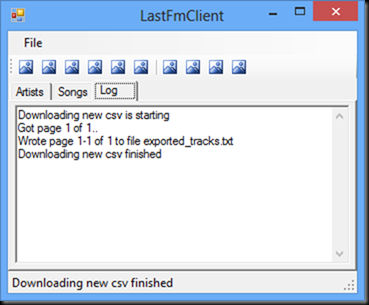
- First we need to download all the scrobbles from the profile. They go into the file
exported_tracks.txt, which is then renamed to the name of the user whose scrobbles you downloaded (for examplesunamo.txt)
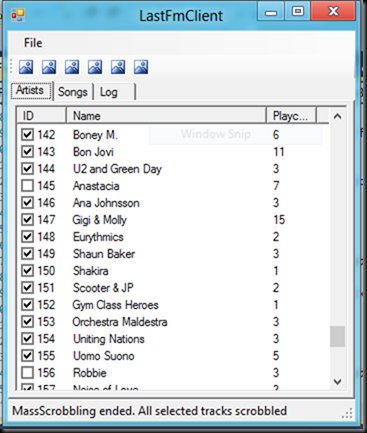
- Here you check all the artists you want to add to your last.fm profile. If you want finer filtering, just open the Songs tab, where you can pick specific songs by each artist.
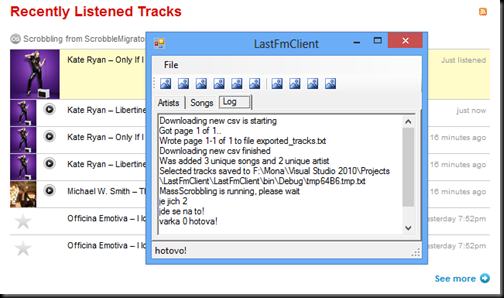
- After selecting the songs, you log in and start scrobbling. If everything goes well, your profile will show the newly scrobbled songs (here there were only 2) from the ScrobbleMigrator application.


Now I would like to convert this application to the Metro style and publish it in the Windows Store. We’ll see whether I manage it and whether I give up somewhere halfway – I already have an idea for another program in my head, “something with music” – a tracker of music charts and what radio stations are playing, so that I have an overview of what’s popular, and so on. I’m really curious how that will turn out. But I should rather do something for other people and not just for myself – I already have a million things for myself. And anyway, I’m off to work on those websites of mine that are still in progress :-).