The program in English looks something like this:
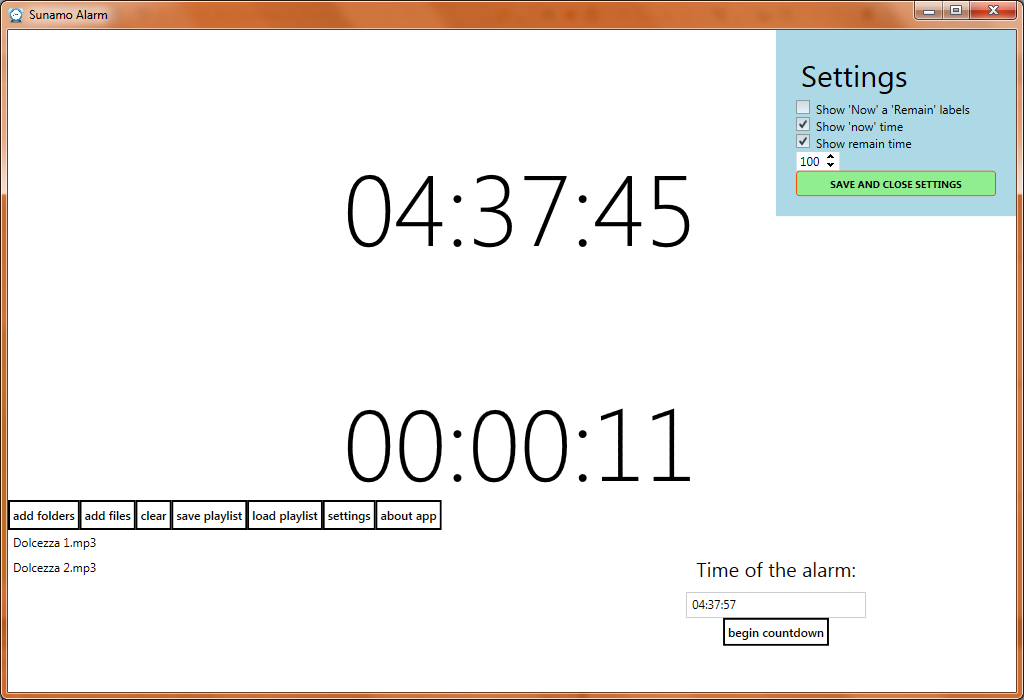
So what can the program do? It is really just a perfectly ordinary alarm:
- Work with a playlist – save it to disk, load it from disk (it is loaded automatically right after startup, but you can also do it manually), clear the whole playback queue, add all files from a folder or add selected files from a folder. When you load a playlist from disk or click
Clear, the whole playlist is cleared, and when loading a playlist from disk, the files are also loaded from disk. - Settings – unfortunately, the program currently handles both times in one-second intervals, but that would not be such a problem. The worse part is that changes only take effect when the given time is incremented or decremented. For the upper time,
Actual, this does not matter, since it is always running. It is worse with the lower time, which runs only when no time is entered or when it is counting down to the wake-up. That is why the 2 checkboxes will have no effect if either of these two conditions has been met, but once you enter a time again, the changes will also show up inRemain. - In the settings you can also choose the font size. The program remembers all settings and saves them to an
.inifile in the program’s application folder. - It is my first program that truly has language support for 2 languages. If you run the program on Czech Windows, you will get it in Czech; on English Windows, you will get it in English.
- For now, the program only supports MP3 files – it will not let you select any others.
- The last things are small details, such as when you start the countdown, music playback stops if it is running, or the
Aboutdialog.
The program has been tested on Windows 7 and 8.1; it may not work correctly on other platforms. Of course, the program also requires .NET FW 4.5.
Links:
👻 The server has been sent to a retirement home for domains.